
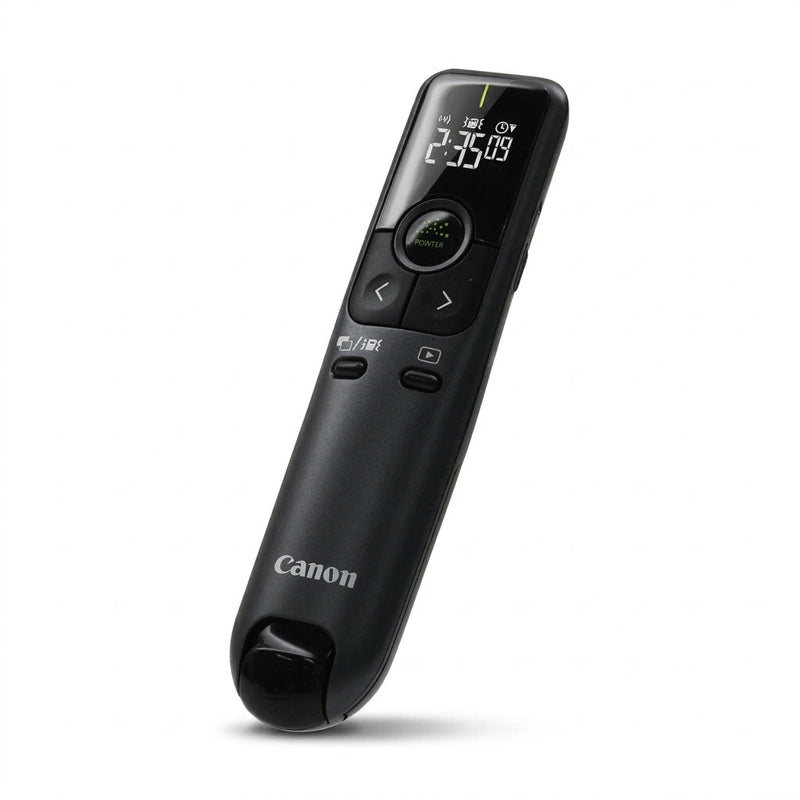


Canon PR10-G Wireless Presentation Clicker with Green Laser Pointer, Timer and 100 ft Range
- 🟢 Green laser 8× more visible than a standard red laser — Canon's own figure
- 📡 Up to 100 ft range about 30 m of room to move
- ⏱️ Backlit timer silent vibration alerts
- 🖱️ Plug-and-play instant setup on Windows and Mac
- 🔋 AAA powered batteries included, no charging
- 🎛️ Keynote or PowerPoint a mode switch on the body, nothing to install
- 💼 Carrying case included and the receiver stows inside the presenter
- 🏷️ Canadian warranty 1-year limited
Out of stock right now. Enter your email and we'll notify you the moment it's back.


The Canon PR10-G is a presentation clicker built around a green laser. Canon rates the green beam at 8 times more visible than a standard red laser, measured against a 650 nm, 1 mW red pointer, and that gap is the whole point. On an LED wall or an LCD panel a red dot often vanishes into the image. Green survives. If you teach, train, or speak in bright rooms, this is the difference between an audience following your point and guessing at it.
Range is up to 100 feet, roughly 30 metres, over the bundled USB receiver; Canon notes that real range depends on the room. The controls sit under your thumb without looking: slideshow forward and back, laser, lock, play and power, plus a timer with its own on-off for the vibration alerts. A switch on the body sets Off, Keynote or PowerPoint.
The backlit LCD shows a countdown timer and the wireless signal strength, and the presenter can buzz you silently at times you set, one minute left, for example, so you are not hunting for a clock at the back of the room. The USB receiver stores inside the presenter body. Nothing to install: plug it in and it works. Canon lists Windows Vista SP2 through Windows 10 and Mac OS X 10.5 to 10.11, with Microsoft PowerPoint and Apple Keynote as the supported applications. Two AAA batteries and a carrying case are in the box, and the unit carries Canon's 1-year limited warranty in Canada. The laser is Class 2, 532 nm, under 1 mW. Never point it at anyone's eyes.
| Laser | Brilliant Green, Class 2. Up to 8× more visible than a standard red laser |
| Range | Up to 100 feet, about 30 m; Canon notes real range depends on the environment |
| Battery | 2× AAA (included) |
| OS compatibility | Windows Vista SP2, 7, 8, 8.1, 10 · Mac OS X 10.5–10.11 |
| Controls | Slideshow forward/back · laser pointer · lock · play · power · timer · timer setting · timer/vibration on-off |
| Receiver | Stored in presenter body |
| Wavelength | 532 nm |
| Maximum output | Under 1 mW |
| Interface | USB 2.0 plug-and-play receiver |
| Presenter modes | Off / Keynote / PowerPoint |
| Software supported | Microsoft PowerPoint · Apple Keynote |
| Display | Backlit LCD. Countdown timer and signal strength |
| Alerts | Silent vibration at user-set times |
| In the box | Presenter · wireless receiver · carrying case · user manual · 2 AAA batteries |
| Warranty | 1-year limited, Canada |
Why buy from Clavia?
Clavia is an authorized Canadian retailer for Canon. Every unit ships from a Canadian warehouse with the manufacturer warranty.
Authorized retailer
No grey-market imports. Genuine Canadian product, manufacturer-certified.
Ships from Canada
Fast delivery from 4 Canadian warehouses. No duties, no customs surprises.
Canadian warranty
Manufacturer warranty. Canadian support if anything requires service.
Hassle-free returns
30-Day Returns, Fast RMA.
Why a green laser instead of red? ›
What's the wireless range? ›
Is setup complicated? ›
How is it powered? ›
Is this the Canadian version with a Canadian warranty? ›
Will I be charged duties or customs fees? ›
How long does shipping take? ›
Does it have a timer? ›
Does it work with Keynote? ›
Does it work with Google Slides? ›
What laser class is it? ›
Which operating systems does Canon list? ›
Where does the receiver go when I'm done? ›
What's in the box? ›
How is this different from the PR100-R? ›
Questions about this product?
Our team knows these products inside-out. Don't be a stranger.